> ## Documentation Index
> Fetch the complete documentation index at: https://docs.orum.io/llms.txt
> Use this file to discover all available pages before exploring further.
# External Accounts
> Initiate payments to bank accounts.
An external account can have one of the following statuses, indicated by the status field.
An external account was created. The external account cannot send or receive funds.
An external account passed verification. The external account can send or receive funds.
An external account did not pass verification. The external account cannot send or receive funds.
An external account was matched against a sanctions watchlist. The external account cannot send or receive funds.
An external account has been soft deleted from Orum’s platform (this action can only be completed by the Orum team). The closed external account cannot send or receive funds.
If you are using your own account verification provider (BYO-AVS), all external accounts you create will automatically have a Verified status, and the POST API response will return the external account with a `status` of `verified`.
All use cases require that external accounts have a status of `verified` in order to send or receive funds. The data requirements for a `verified` external account are listed below:
**Verified External Account**
* Account reference ID
* Customer reference ID (unique customer\_reference\_id for the associated person or business)
* Customer resource type (person, business or enterprise)
* Account Type (checking or savings)
* Account Number
* Routing Number
* Account Holder Name
## Diagram
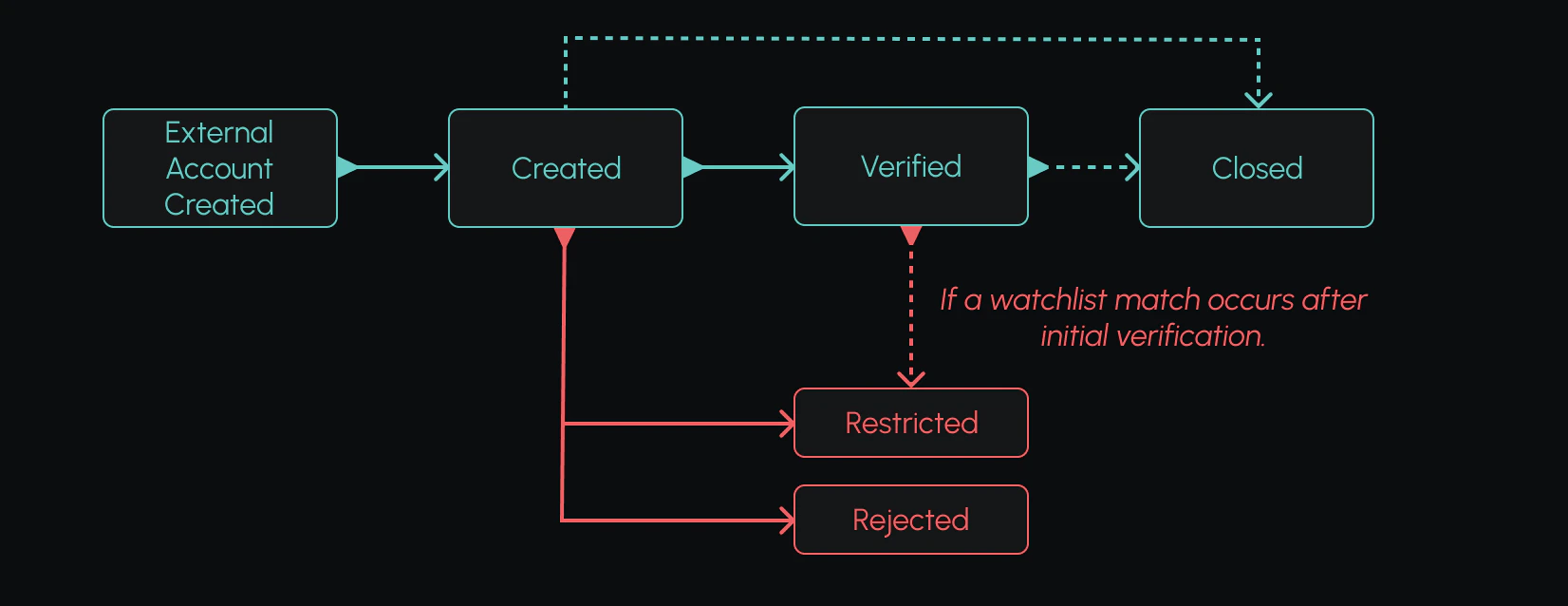
The below example shows how an external account can move through the above statuses. Note that an external account can move from “verified” to “restricted” if an external account matches a sanctions list anytime after its initial verification.
 ## Webhook Example
Deliver sends webhooks to notify you of changes to an external account’s status.
```json theme={null}
{
"event_id": "317c6916-6518-4492-be67-91fac4637629",
"event_type": "external_account_verified",
"created_at": "2022-08-26T18:50:27.671Z",
"event_data": {
"external_account": {
"id": "4c8f7e72-092e-4621-8cf8-4774915eaf01",
"account_reference_id": "ab76d-9363bd-s27d",
"account_type": "checking",
"account_number": "012345678",
"routing_number": "021000021",
"account_holder_name": "John Doe",
"status": "verified",
"created_at": "2022-08-26T18:49:14.622818Z",
"updated_at": "2022-08-26T18:50:02.399925Z"
}
}
}
```
## Webhook Example
Deliver sends webhooks to notify you of changes to an external account’s status.
```json theme={null}
{
"event_id": "317c6916-6518-4492-be67-91fac4637629",
"event_type": "external_account_verified",
"created_at": "2022-08-26T18:50:27.671Z",
"event_data": {
"external_account": {
"id": "4c8f7e72-092e-4621-8cf8-4774915eaf01",
"account_reference_id": "ab76d-9363bd-s27d",
"account_type": "checking",
"account_number": "012345678",
"routing_number": "021000021",
"account_holder_name": "John Doe",
"status": "verified",
"created_at": "2022-08-26T18:49:14.622818Z",
"updated_at": "2022-08-26T18:50:02.399925Z"
}
}
}
```