> ## Documentation Index
> Fetch the complete documentation index at: https://docs.orum.io/llms.txt
> Use this file to discover all available pages before exploring further.
# Changelog
> Discover the latest features and improvements in Orum.
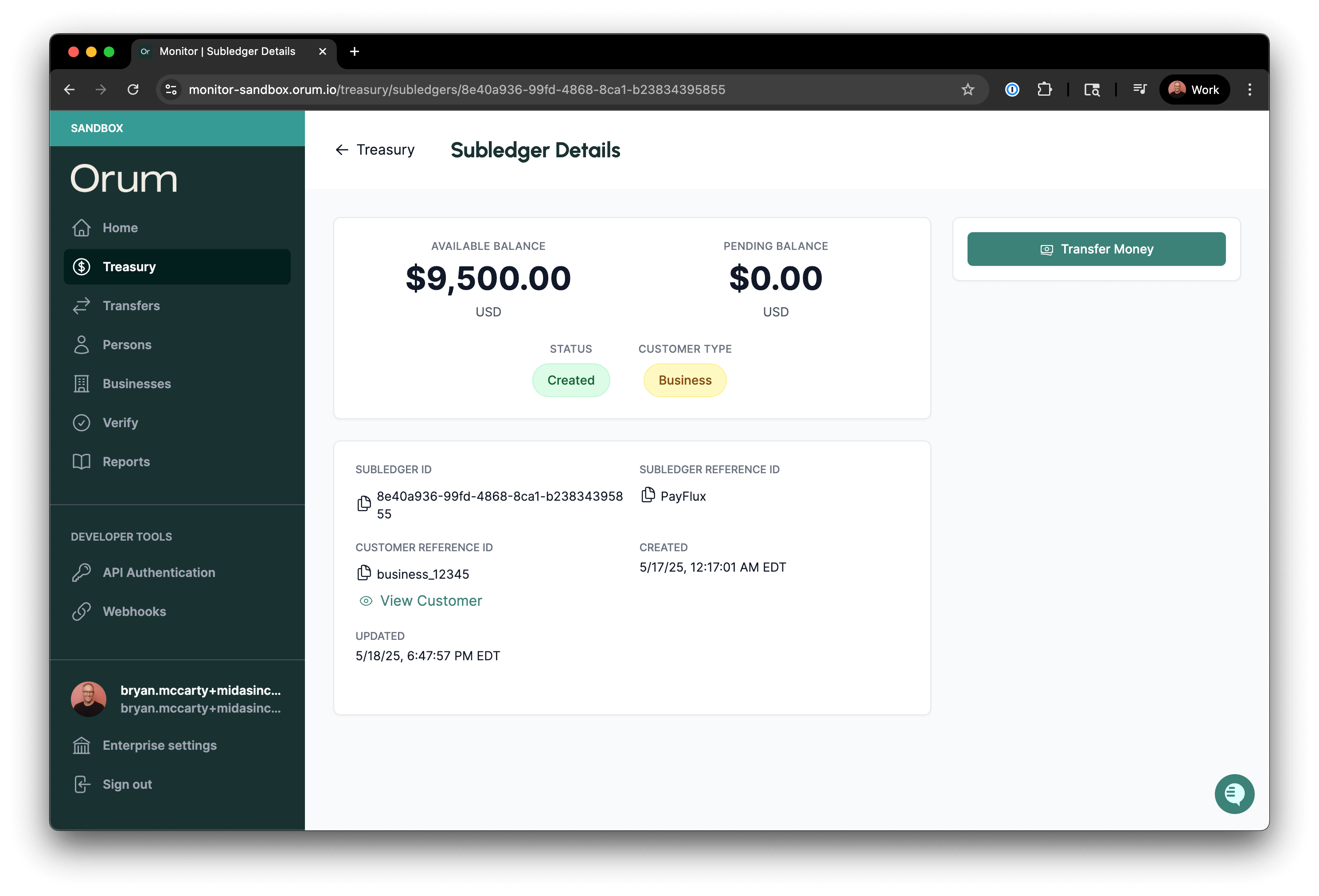
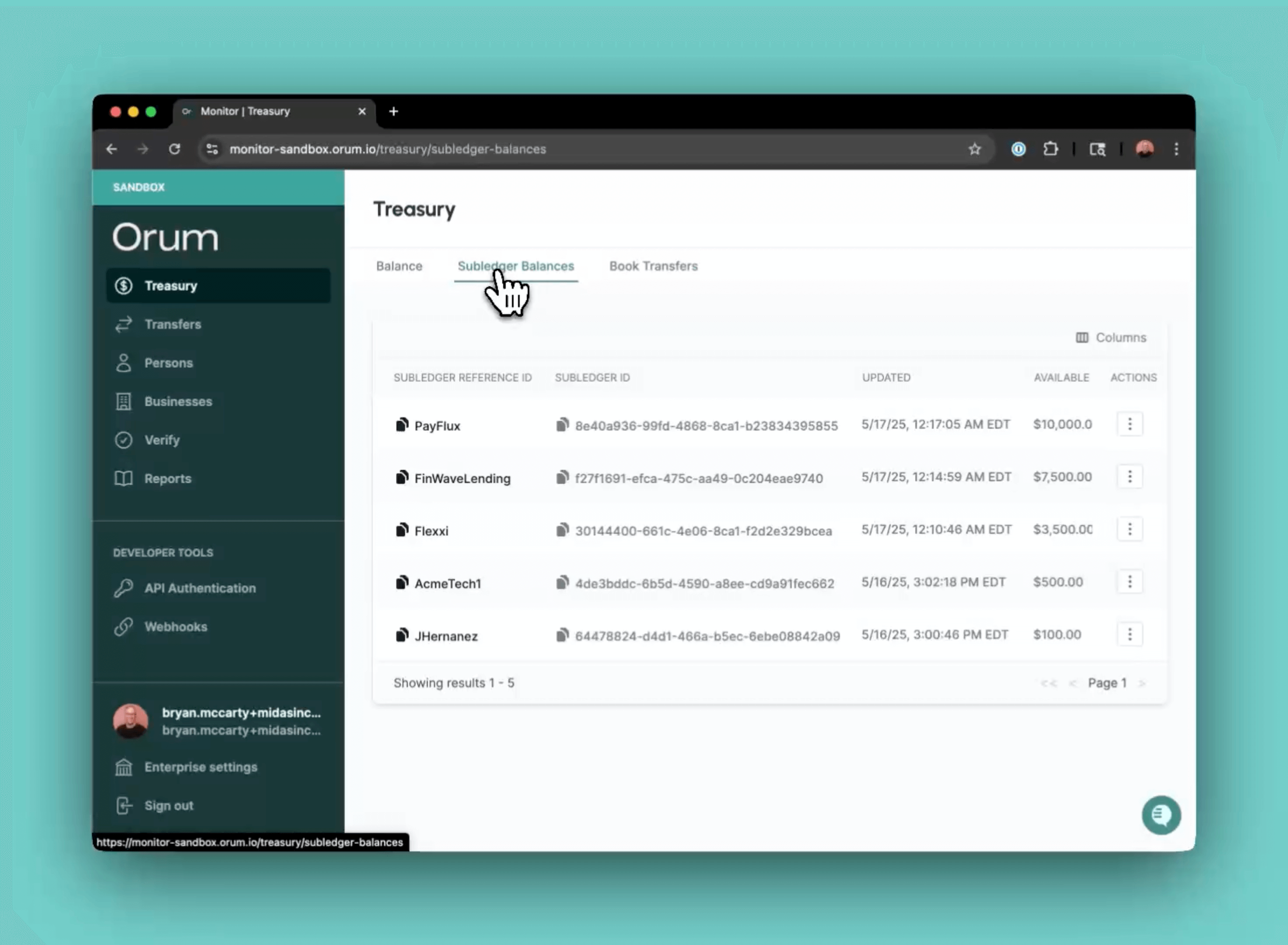
## New: Subledger Details Page In Monitor
As a follow up to the the recently announced [Transfer Details Page](#june-24%2C-2025), we’ve added a new details page for subledgers. The new view gives you additional subledger details such as `customer reference id` and `customer type`.
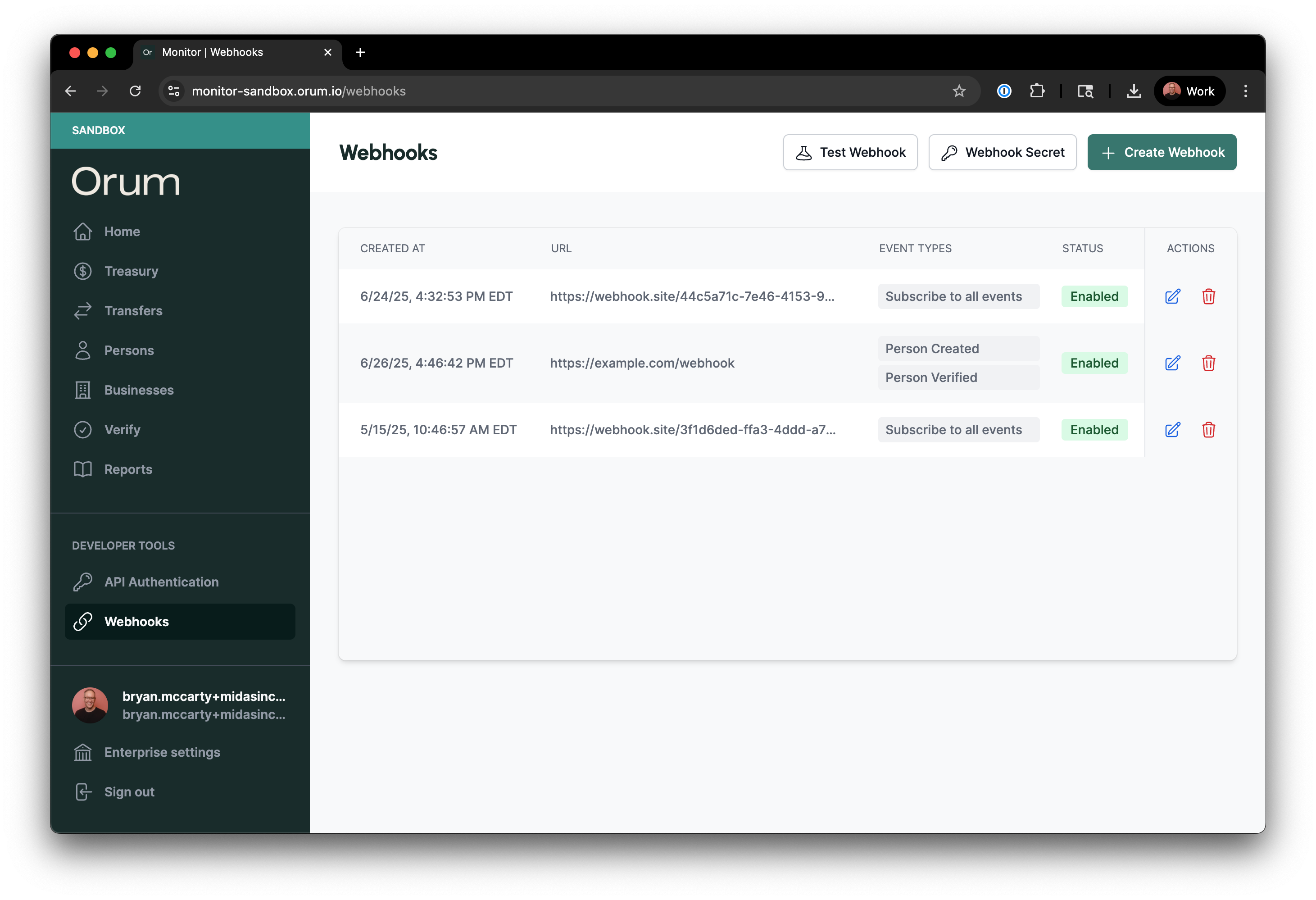
 ## New: Manage Webhooks Through Monitor
[Monitor](https://monitor.orum.io/) now provides a user-friendly interface for managing your webhook configurations. `Admin` and `Developer` users can **create**, **view**, **update**, and **delete** webhook configurations directly through the portal, eliminating the need to use API endpoints for basic webhook management.
[Webhook Management Guide](/guides/monitor/webhooks/webhook-management)
## New: Manage Webhooks Through Monitor
[Monitor](https://monitor.orum.io/) now provides a user-friendly interface for managing your webhook configurations. `Admin` and `Developer` users can **create**, **view**, **update**, and **delete** webhook configurations directly through the portal, eliminating the need to use API endpoints for basic webhook management.
[Webhook Management Guide](/guides/monitor/webhooks/webhook-management)
 ## New: Transfer Details Page & History Endpoint
**Transfer Details Page**
We’ve overhauled the transfer details page in Monitor. The new view gives you everything you need to know about a transfer, including granular statuses with a transfer tracker:
**History Endpoint**
We’ve also made it easier to reconcile balances and troubleshoot issues with a new history endpoint [deliver/transfers/id/history](/api-reference/deliver/transfers/get-transfer-history):
* Get A Detailed History of Transfer Statues
* View Timestamps For Each Status Change
* View Status Updates For Both Single And Dual Leg Transfers
## Updated: Move Funds To or From Your Orum Balance
You can now move funds **to** or **from** your Orum balance via Monitor. Previously, you could only move funds into your Orum balance via a top-up.
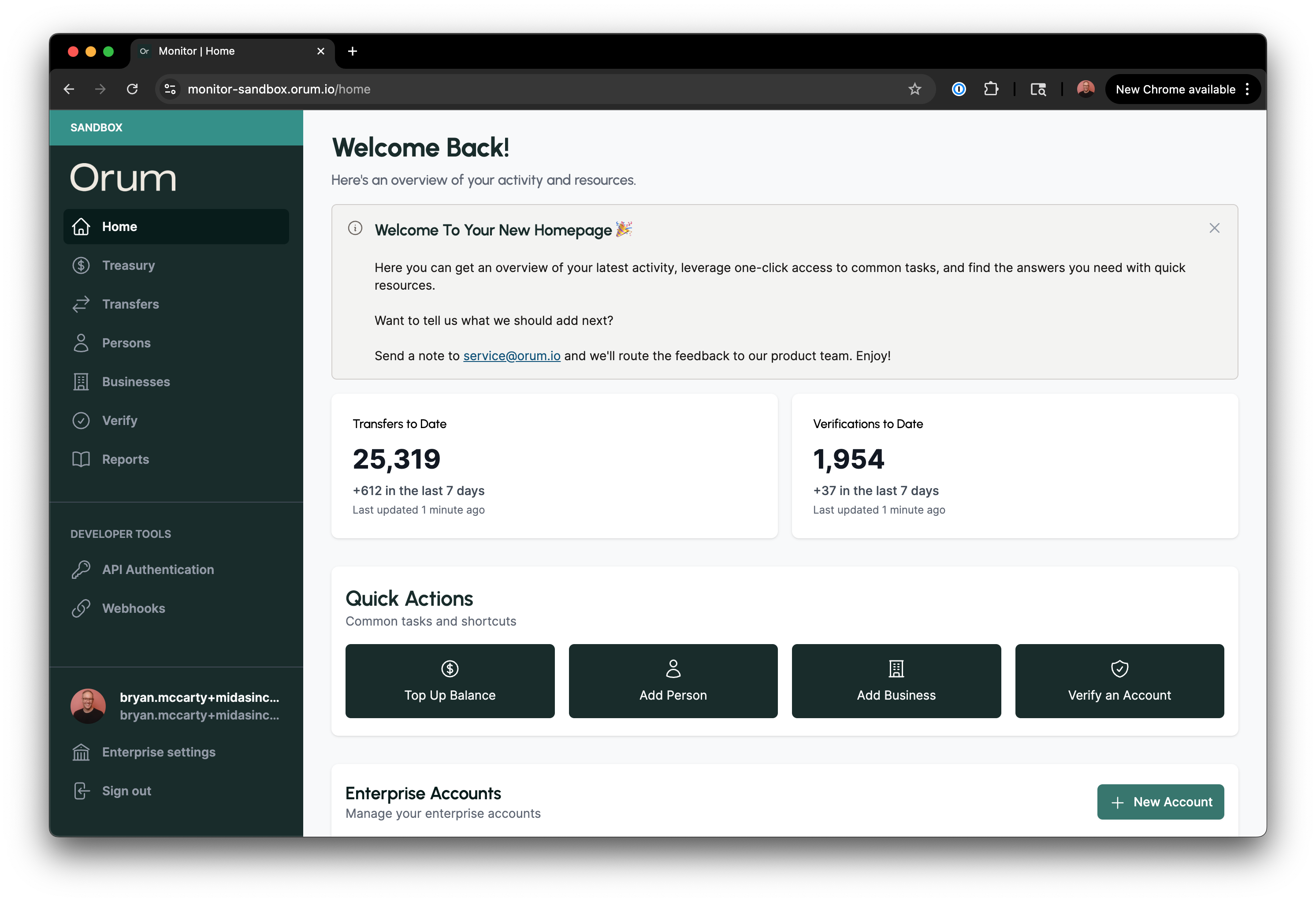
## New: Monitor's Reimagined Homepage
We just launched a new homepage experience in Monitor, the custom-built portal that gives you a real-time look at your transfers and bank account verifications – making it easy to reconcile balances, troubleshoot customer issues, and export reports.
[Log into Monitor](http://monitor.orum.io/)
## New: Transfer Details Page & History Endpoint
**Transfer Details Page**
We’ve overhauled the transfer details page in Monitor. The new view gives you everything you need to know about a transfer, including granular statuses with a transfer tracker:
**History Endpoint**
We’ve also made it easier to reconcile balances and troubleshoot issues with a new history endpoint [deliver/transfers/id/history](/api-reference/deliver/transfers/get-transfer-history):
* Get A Detailed History of Transfer Statues
* View Timestamps For Each Status Change
* View Status Updates For Both Single And Dual Leg Transfers
## Updated: Move Funds To or From Your Orum Balance
You can now move funds **to** or **from** your Orum balance via Monitor. Previously, you could only move funds into your Orum balance via a top-up.
## New: Monitor's Reimagined Homepage
We just launched a new homepage experience in Monitor, the custom-built portal that gives you a real-time look at your transfers and bank account verifications – making it easy to reconcile balances, troubleshoot customer issues, and export reports.
[Log into Monitor](http://monitor.orum.io/)
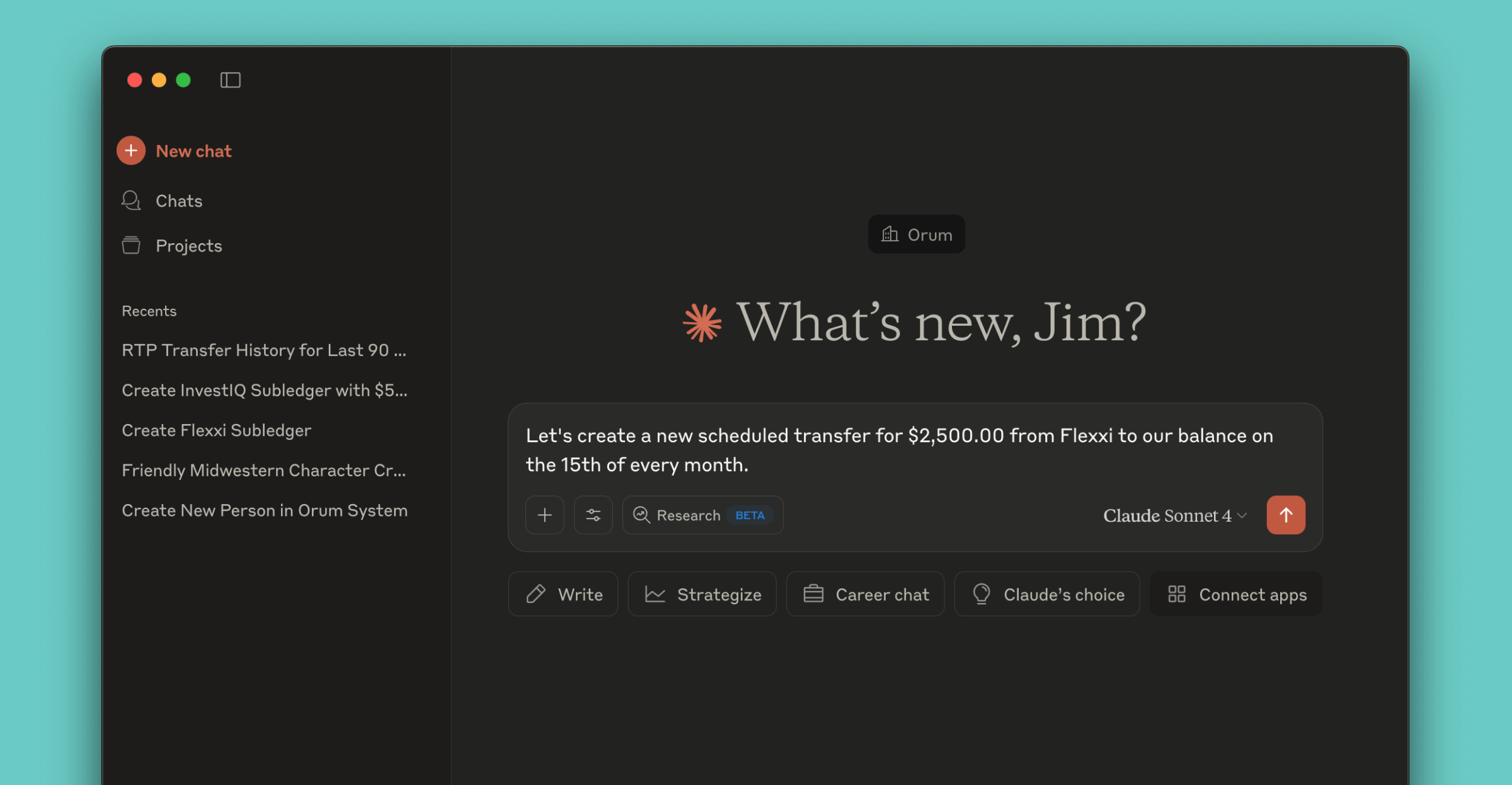
 ## MCP Server
We’re excited to introduce the addition of [MCP Server support](/guides/mcp-server) in our platform,\
enabling new ways to interact with Orum APIs using natural language.
## MCP Server
We’re excited to introduce the addition of [MCP Server support](/guides/mcp-server) in our platform,\
enabling new ways to interact with Orum APIs using natural language.
 ## Introducing Subledgers: Report on Multiple Balance Types
Subledgers allow you to segregate balances by flow of funds or by each of your customers. This means you can create subledgers to track individual transactions related to specific areas of your business, such as accounts payable and accounts receivable. If you're a platform, you also can create subledgers for each of your customers — giving you a real-time ledger that tracks the activity for each customer so you can run sophisticated treasury management while keeping detailed financial records.
[Subledgers Guide](/guides/deliver/subledgers)
## Introducing Subledgers: Report on Multiple Balance Types
Subledgers allow you to segregate balances by flow of funds or by each of your customers. This means you can create subledgers to track individual transactions related to specific areas of your business, such as accounts payable and accounts receivable. If you're a platform, you also can create subledgers for each of your customers — giving you a real-time ledger that tracks the activity for each customer so you can run sophisticated treasury management while keeping detailed financial records.
[Subledgers Guide](/guides/deliver/subledgers)
 ## Balance Summary Report
Balance Top-Ups now display as their own category instead of being grouped with ACH/SDACH.
## Enhanced Transfer Failure Reason Codes
We've added the following reason codes to help better inform and troubleshoot transfer failures:
| Reason Code | Description |
| --------------------------------- | --------------------------------------------------------------------------------------------------------------------------------------------------- |
| enterprise\_insufficient\_funds | There is an insufficient enterprise balance and the transfer request cannot be completed. |
| transfer\_group\_customer\_status | The customer associated with this transfer group is invalid. |
| transfer\_group\_account\_status | The account associated with this transfer group is invalid. |
| invalid\_account | The account is invalid. |
| card\_expired | The expiration date provided is expired. |
| account\_not\_verified | The account did not pass verification. |
| invalid\_routing\_number | The routing number is invalid. |
| incomplete\_card\_holder\_address | The card holder address is incomplete. Please provide address1, city, state, and zip5. |
| invalid\_flow\_of\_funds | The flow of funds attempted is not permitted. The status of the transfer parties may be incorrect or you may not have access to this flow of funds. |
## Business Name Match
You can now use Verify for business name match! This enhancement has been added to our existing [Verify API](/api-reference/verify/post-verify-accounts). Simply populate business name details and receive a match response instantly!
## Enhanced Account Ownership Verification
In addition to names for consumer and business accounts, you can now also optionally match on phone numbers, SSN, and tax ID! See our [guide](https://docs.orum.io/guides/verify-account-ownership) and [API docs](https://docs.orum.io/api-reference/verify/post-verify-accounts) for more info.
## Update to Account Number Validation
When you create or update external accounts, account numbers must be between 4-17 digits. The Deliver API previously accepted 1-17 digits.
## Scheduled Payments
You can now schedule payments via Deliver & Monitor! Simply follow the steps outlined in our [Deliver Guide](/guides/scheduled-payments) & [Monitor Guide](/guides/monitor-schedule-payments) on how to get started.
## Export Persons, Businesses, and Verify Tables to a CSV
We added the ability to export information in the Persons, Businesses, and Verify tables to CSV! Simply navigate to the table and click on the "Export" button in the right corner. Any selected filters on the table will also apply to the exported data.
## Balance Summary Report
Balance Top-Ups now display as their own category instead of being grouped with ACH/SDACH.
## Enhanced Transfer Failure Reason Codes
We've added the following reason codes to help better inform and troubleshoot transfer failures:
| Reason Code | Description |
| --------------------------------- | --------------------------------------------------------------------------------------------------------------------------------------------------- |
| enterprise\_insufficient\_funds | There is an insufficient enterprise balance and the transfer request cannot be completed. |
| transfer\_group\_customer\_status | The customer associated with this transfer group is invalid. |
| transfer\_group\_account\_status | The account associated with this transfer group is invalid. |
| invalid\_account | The account is invalid. |
| card\_expired | The expiration date provided is expired. |
| account\_not\_verified | The account did not pass verification. |
| invalid\_routing\_number | The routing number is invalid. |
| incomplete\_card\_holder\_address | The card holder address is incomplete. Please provide address1, city, state, and zip5. |
| invalid\_flow\_of\_funds | The flow of funds attempted is not permitted. The status of the transfer parties may be incorrect or you may not have access to this flow of funds. |
## Business Name Match
You can now use Verify for business name match! This enhancement has been added to our existing [Verify API](/api-reference/verify/post-verify-accounts). Simply populate business name details and receive a match response instantly!
## Enhanced Account Ownership Verification
In addition to names for consumer and business accounts, you can now also optionally match on phone numbers, SSN, and tax ID! See our [guide](https://docs.orum.io/guides/verify-account-ownership) and [API docs](https://docs.orum.io/api-reference/verify/post-verify-accounts) for more info.
## Update to Account Number Validation
When you create or update external accounts, account numbers must be between 4-17 digits. The Deliver API previously accepted 1-17 digits.
## Scheduled Payments
You can now schedule payments via Deliver & Monitor! Simply follow the steps outlined in our [Deliver Guide](/guides/scheduled-payments) & [Monitor Guide](/guides/monitor-schedule-payments) on how to get started.
## Export Persons, Businesses, and Verify Tables to a CSV
We added the ability to export information in the Persons, Businesses, and Verify tables to CSV! Simply navigate to the table and click on the "Export" button in the right corner. Any selected filters on the table will also apply to the exported data.
 ## Use Card Rails To Move Money
We enhanced the capabilities of our Deliver API to include real-time fund transfers to and from bank accounts via debit card, powered by Visa Direct.
Using the new [card transfers](/api-reference/deliver/cards/post-card), U.S. customers are now able to use Deliver to reach over 99% of bank accounts in the US via a linked debit card.
To do this, initiate an API request with speed `asap` with a linked card as the destination, and funds will arrive in seconds.
Interested in incorporating cards in your production flows? Reach out to [service@orum.io](mailto:service@orum.io) and we'll get you set up quickly.
## Lookup Trace IDs
You may now lookup a trace ID for a transfer through our Portal & API!
In the API, there are now two new fields located in the source and destination objects of the [Transfers object](/api-reference/deliver/transfers/post-transfer). These fields are `trace_number` and `return_trace_number`.
In the portal, there are two places where the trace number can be looked up:
1. New selectable columns in the Transfers Table, `Trace Number` and `Return Trace Number`
2. Within the `Transfer Details` page for each transfer, under the `Source` and `Destination` headers
Trace numbers will only be present for transfers on a go-forward basis, and may not always be available, depending on the processor.
## Deleting Resources
You can now delete [persons](/api-reference/deliver/persons/delete-person), [businesses](/api-reference/deliver/businesses/delete-business) and [external accounts](/api-reference/deliver/external-accounts/delete-external-account) through the portal or via an API request.
To delete in the portal, simply navigate to the `Actions` menu of the persons, businesses, or accounts table, and select `Delete` for the entity that you'd like to delete.
## Use Card Rails To Move Money
We enhanced the capabilities of our Deliver API to include real-time fund transfers to and from bank accounts via debit card, powered by Visa Direct.
Using the new [card transfers](/api-reference/deliver/cards/post-card), U.S. customers are now able to use Deliver to reach over 99% of bank accounts in the US via a linked debit card.
To do this, initiate an API request with speed `asap` with a linked card as the destination, and funds will arrive in seconds.
Interested in incorporating cards in your production flows? Reach out to [service@orum.io](mailto:service@orum.io) and we'll get you set up quickly.
## Lookup Trace IDs
You may now lookup a trace ID for a transfer through our Portal & API!
In the API, there are now two new fields located in the source and destination objects of the [Transfers object](/api-reference/deliver/transfers/post-transfer). These fields are `trace_number` and `return_trace_number`.
In the portal, there are two places where the trace number can be looked up:
1. New selectable columns in the Transfers Table, `Trace Number` and `Return Trace Number`
2. Within the `Transfer Details` page for each transfer, under the `Source` and `Destination` headers
Trace numbers will only be present for transfers on a go-forward basis, and may not always be available, depending on the processor.
## Deleting Resources
You can now delete [persons](/api-reference/deliver/persons/delete-person), [businesses](/api-reference/deliver/businesses/delete-business) and [external accounts](/api-reference/deliver/external-accounts/delete-external-account) through the portal or via an API request.
To delete in the portal, simply navigate to the `Actions` menu of the persons, businesses, or accounts table, and select `Delete` for the entity that you'd like to delete.
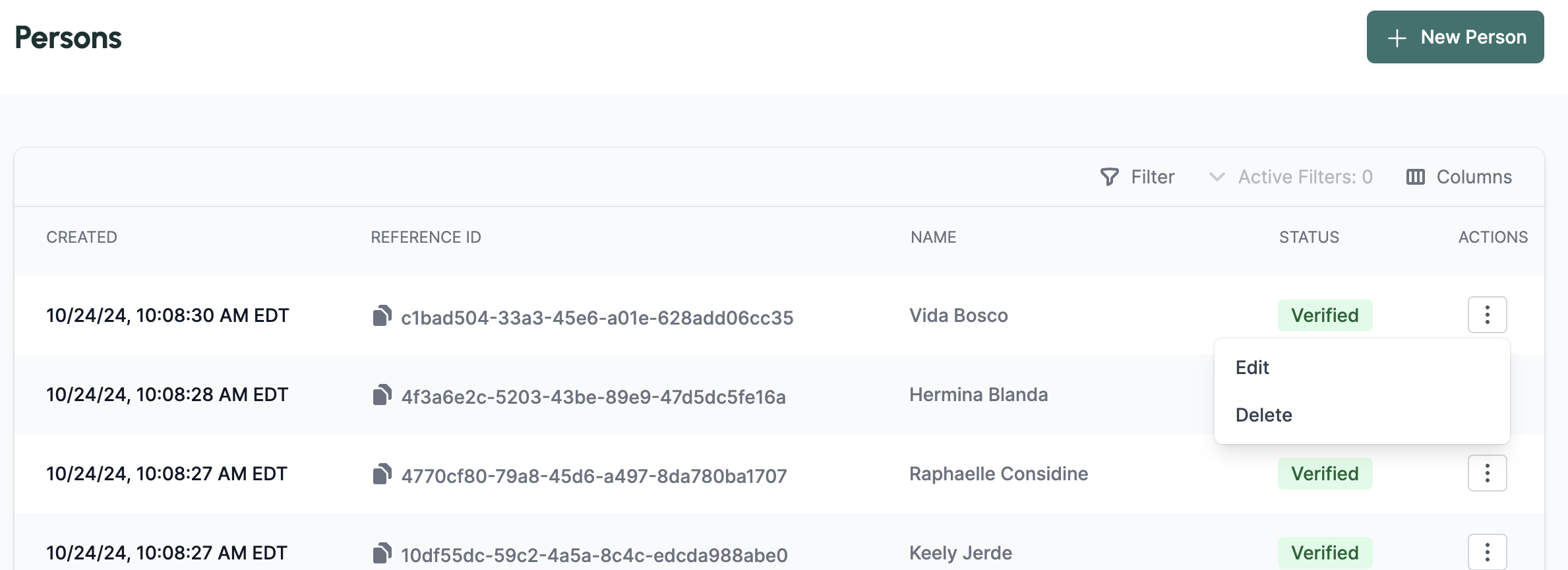 Once deleted, the status of the resource will transition to `closed` and the resources will still appear in GET responses.
## New Enhanced Search & Filter
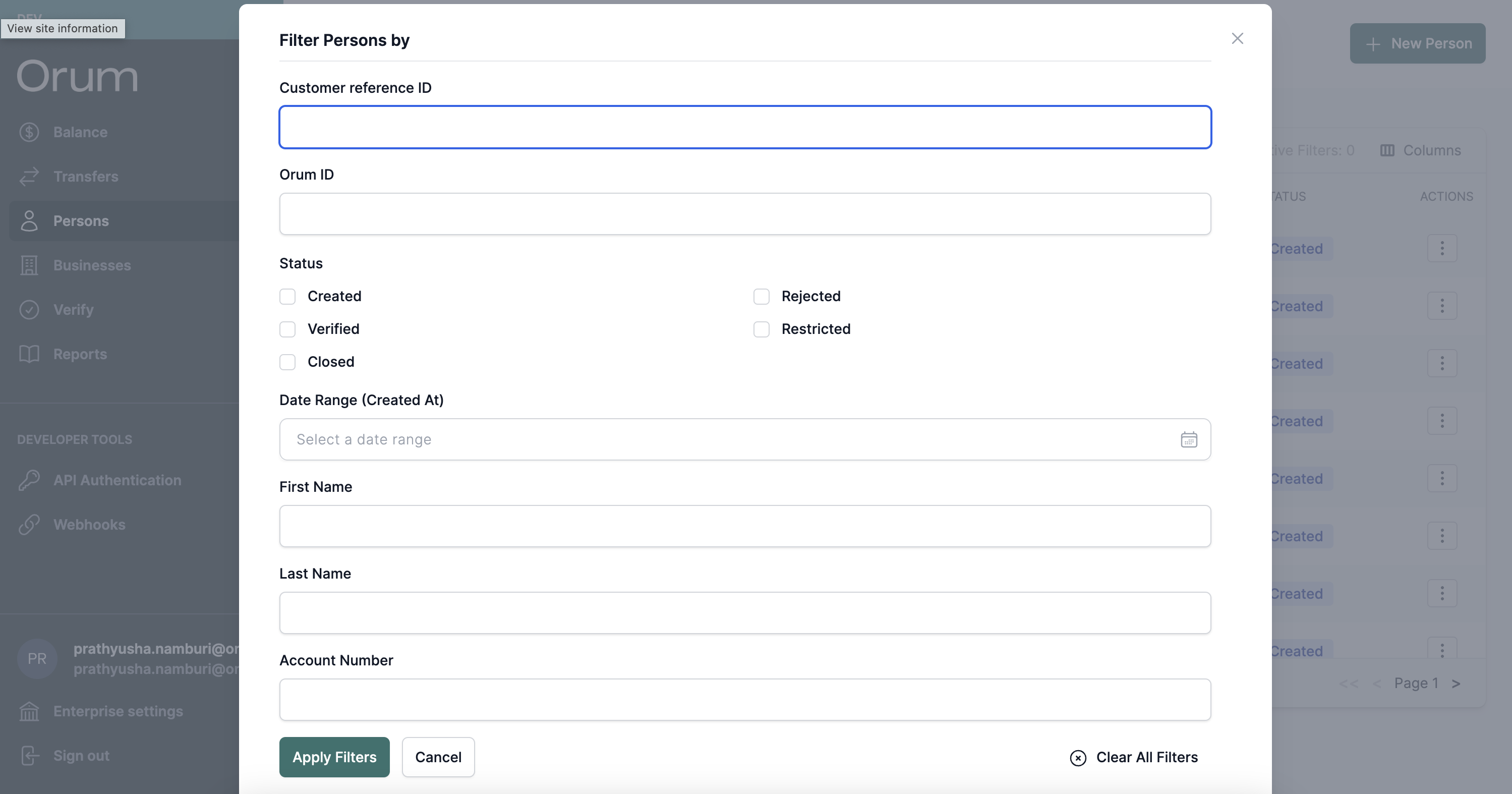
You can now search the Persons, Businesses, Transfers, and Verify tables using additional advanced [Search & Filter](/guides/monitor-search-filter).
To try it out, click the new `Filter` button in the table, as seen below:
Once deleted, the status of the resource will transition to `closed` and the resources will still appear in GET responses.
## New Enhanced Search & Filter
You can now search the Persons, Businesses, Transfers, and Verify tables using additional advanced [Search & Filter](/guides/monitor-search-filter).
To try it out, click the new `Filter` button in the table, as seen below:
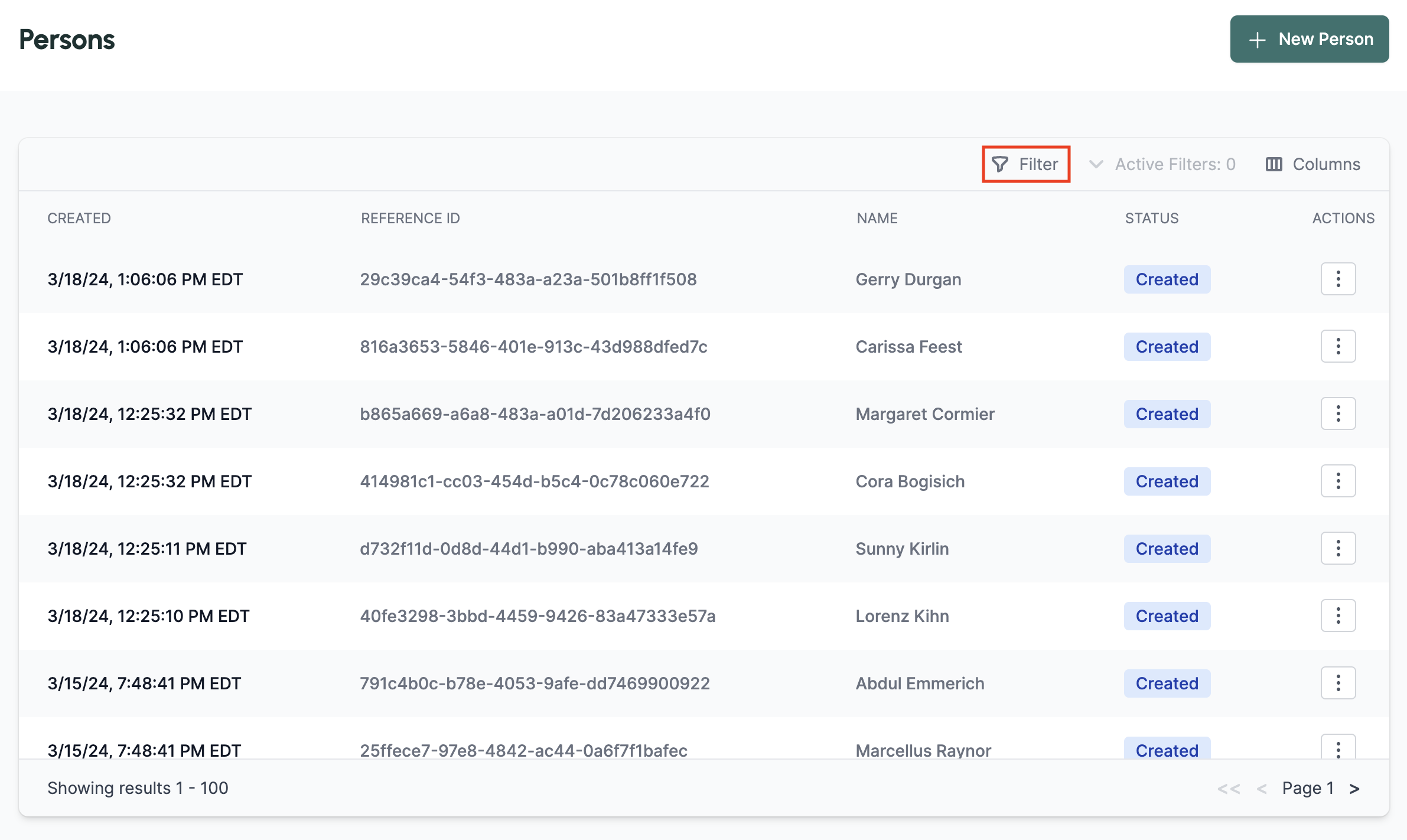 You will then see a pop-up that includes all the additional parameters that you can filter by. You may filter by a single parameter or multiple. See below for an examples of the new pop-up as well as a filtered table.
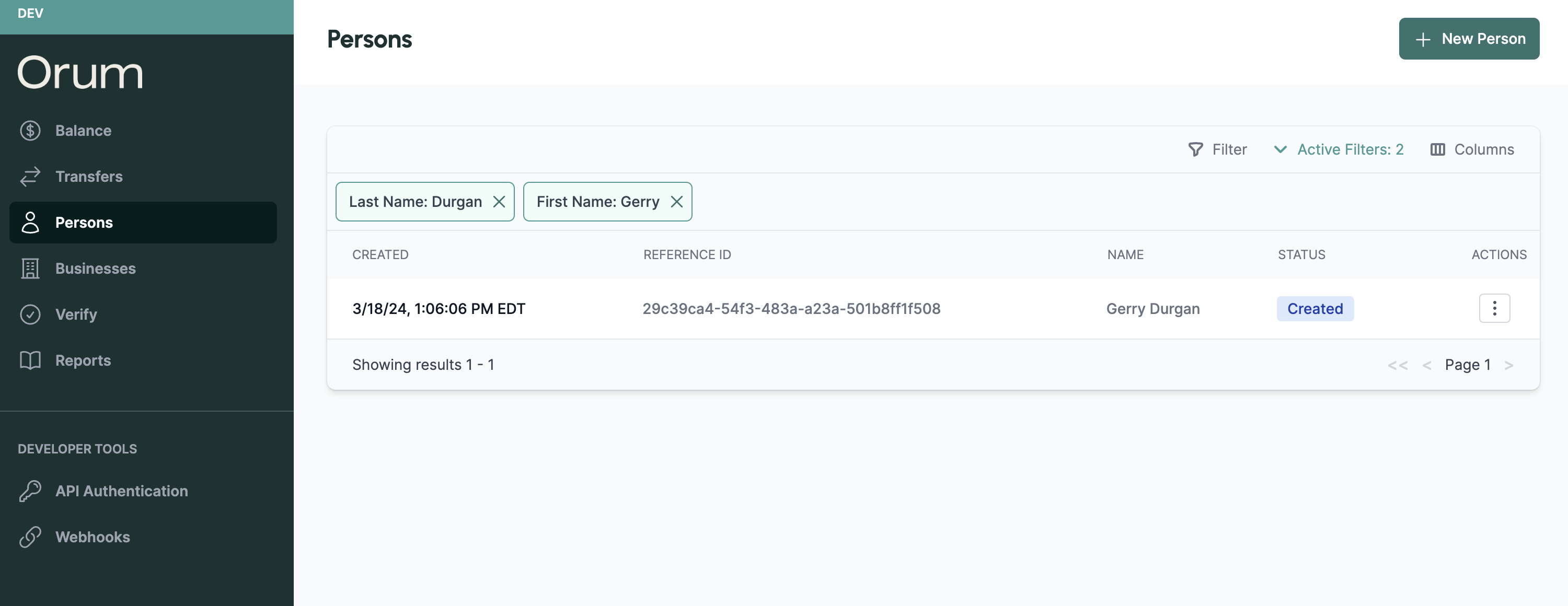 Happy searching! If you have any questions or feedback, please reach out to the team at [service@orum.io](mailto:service@orum.io)!
## Verify Now Validates Account Ownership Via Name Match
You now can do even more with Verify, our first-of-its-kind bank account verification solution.
Today, we're thrilled to announce a third tier of verification, [Verify Account Ownership Via Name Match](/guides/verify-account-ownership-via-name-match), all available via the same API integration.
With three distinct verification tiers now available, we've also made Verify more flexible so you can choose whether to validate bank account status or turn on higher tiers that also validate the control of the bank account or ownership via name match.
To achieve this, a new `type` of bank account verification field has been added to the [Verify API](/api-reference/verify/post-verify-accounts), giving you the option to run tiered Verify requests either independently or simultaneously:
* Verifies the status of a bank account alongside the Account Ownership Via Name Match request
* Verifies the status of a bank account and that the end user has control of the bank account alongside the name match request.
If you don't have access to Verify and would like to discuss adding the solution or if you have additional questions about the latest enhancements, we'd be happy to chat. You can reach out to our team either by replying to this message or emailing [service@orum.io](mailto:service@orum.io).
## Cancel Transfers via Portal and API
You can now cancel transfers through the portal or through an API request.
### Cancel via Portal
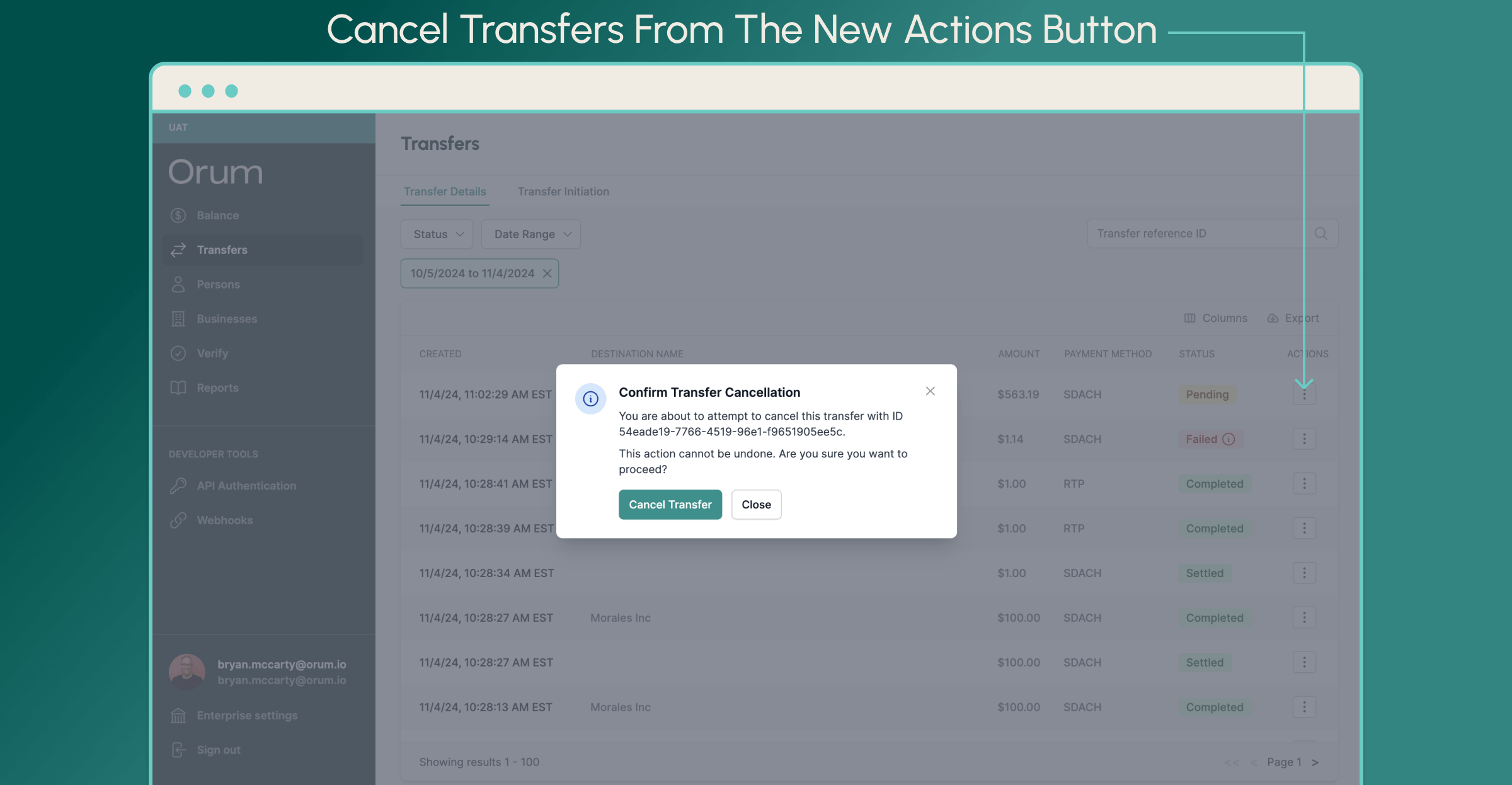
From the Transfers page within the Orum Portal, click the new Actions button, select Cancel, and confirm your choice. That's it! The status of the transfer will update to Failed and display an info icon noting that the transfer was manually canceled.
Happy searching! If you have any questions or feedback, please reach out to the team at [service@orum.io](mailto:service@orum.io)!
## Verify Now Validates Account Ownership Via Name Match
You now can do even more with Verify, our first-of-its-kind bank account verification solution.
Today, we're thrilled to announce a third tier of verification, [Verify Account Ownership Via Name Match](/guides/verify-account-ownership-via-name-match), all available via the same API integration.
With three distinct verification tiers now available, we've also made Verify more flexible so you can choose whether to validate bank account status or turn on higher tiers that also validate the control of the bank account or ownership via name match.
To achieve this, a new `type` of bank account verification field has been added to the [Verify API](/api-reference/verify/post-verify-accounts), giving you the option to run tiered Verify requests either independently or simultaneously:
* Verifies the status of a bank account alongside the Account Ownership Via Name Match request
* Verifies the status of a bank account and that the end user has control of the bank account alongside the name match request.
If you don't have access to Verify and would like to discuss adding the solution or if you have additional questions about the latest enhancements, we'd be happy to chat. You can reach out to our team either by replying to this message or emailing [service@orum.io](mailto:service@orum.io).
## Cancel Transfers via Portal and API
You can now cancel transfers through the portal or through an API request.
### Cancel via Portal
From the Transfers page within the Orum Portal, click the new Actions button, select Cancel, and confirm your choice. That's it! The status of the transfer will update to Failed and display an info icon noting that the transfer was manually canceled.
 ### Cancel via API
Please check out our [Cancel API Docs](/api-reference/deliver/transfers/post-transfer-cancel) here!
**General Notes on Cancellations**
* Cancellations cannot be reversed.
* Transfers may only be canceled if they are in "Pending" status. If a transfer is unable to be canceled, the option will be greyed out.
* Canceling an ACH or SDACH transfer will only succeed if the transfer has not yet been submitted for processing (see cutoff times for more details).
* For A2A transfers, the credit leg may be canceled regardless of the payment method (RTP, FedNow, ACH, or SDACH) if the credit leg has not yet been submitted.
* Only users with Admin or Payment Initiator roles are enabled to cancel transfers.
## Verify Single Accounts via Portal
You can now do even more with Verify from the Orum Portal. Our new enhancements make it easy for you to [Verify Account Status](/guides/verify-status) of individual bank accounts with a few simple clicks — giving your operations more flexibility and efficiency to handle one-off Account Status verifications.
### Here are the details:
From the Verify page within the Orum Portal, click the **+ Verify Account** button, fill in the information, and then **Verify Account**. That's it — the results will appear as a new row in the **Verify Details** table.
### Cancel via API
Please check out our [Cancel API Docs](/api-reference/deliver/transfers/post-transfer-cancel) here!
**General Notes on Cancellations**
* Cancellations cannot be reversed.
* Transfers may only be canceled if they are in "Pending" status. If a transfer is unable to be canceled, the option will be greyed out.
* Canceling an ACH or SDACH transfer will only succeed if the transfer has not yet been submitted for processing (see cutoff times for more details).
* For A2A transfers, the credit leg may be canceled regardless of the payment method (RTP, FedNow, ACH, or SDACH) if the credit leg has not yet been submitted.
* Only users with Admin or Payment Initiator roles are enabled to cancel transfers.
## Verify Single Accounts via Portal
You can now do even more with Verify from the Orum Portal. Our new enhancements make it easy for you to [Verify Account Status](/guides/verify-status) of individual bank accounts with a few simple clicks — giving your operations more flexibility and efficiency to handle one-off Account Status verifications.
### Here are the details:
From the Verify page within the Orum Portal, click the **+ Verify Account** button, fill in the information, and then **Verify Account**. That's it — the results will appear as a new row in the **Verify Details** table.
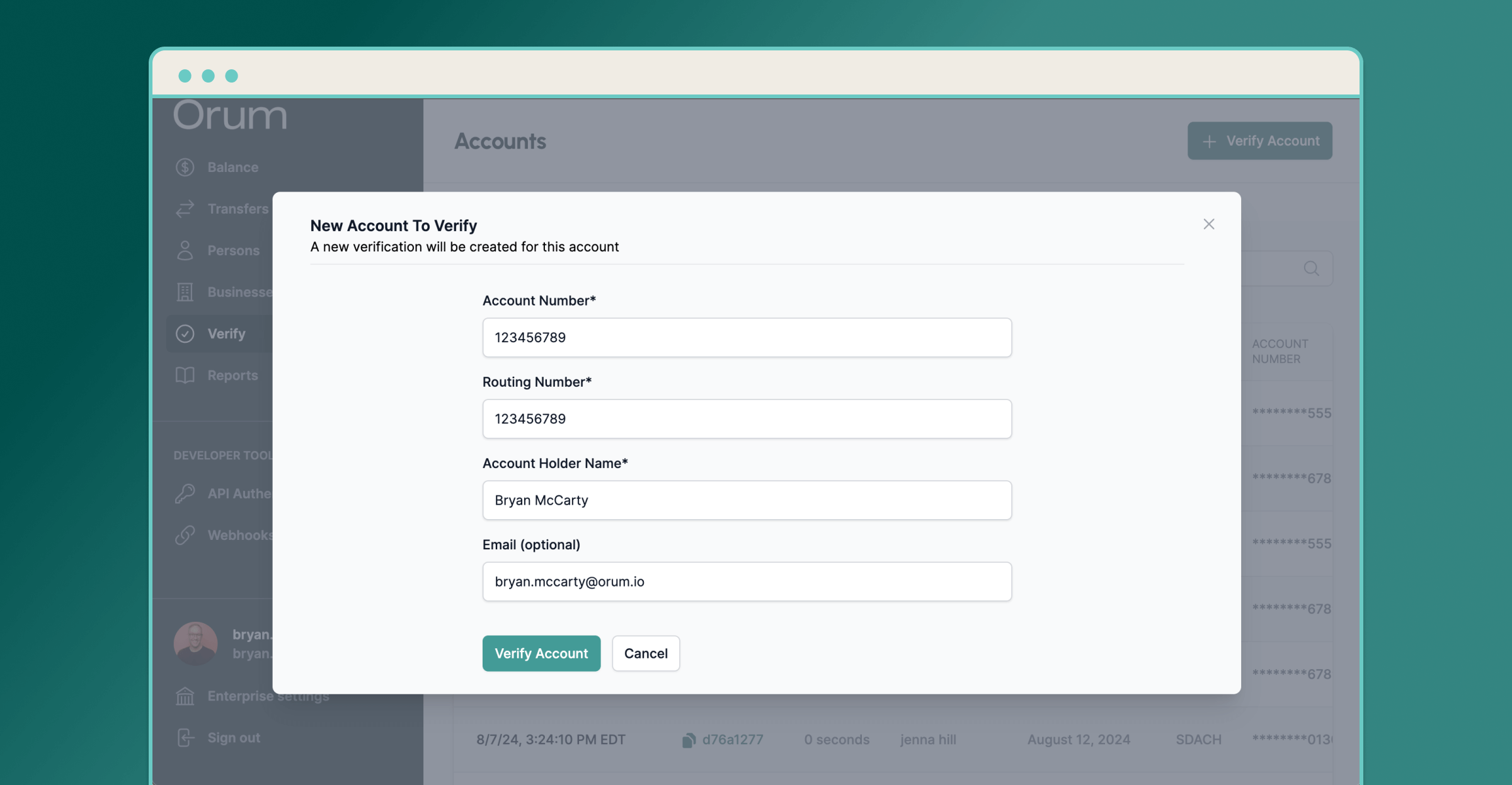 It's important to note that only users with Admin or Payment Initiator roles are enabled to use this new feature.
## Routing Number Validation Check on Creating External Accounts
When creating an external account, we have now added a synchronous validation check to ensure that the routing number that is being passed is a [valid routing number](https://www.aba.com/about-us/routing-number).
If the routing number is not valid, we fail the creation of the account and send an error message as shown below:
```json theme={null}
{
"error_code": "invalid_routing_number",
"message": "Routing number is invalid. Pass a valid 9-digit routing number."
}
```
## New: Initiate Payments Directly in our Portal!
You can now initiate single leg payments directly through the Orum Portal! See below for a breakdown of the newly available feature.
**Top Ups to your FBO**
You can now top up your FBO balance directly through the portal. Simply log in to the Orum Portal and visit the "Balance" page. You should see a "Top up balance" button in the top right as below:
It's important to note that only users with Admin or Payment Initiator roles are enabled to use this new feature.
## Routing Number Validation Check on Creating External Accounts
When creating an external account, we have now added a synchronous validation check to ensure that the routing number that is being passed is a [valid routing number](https://www.aba.com/about-us/routing-number).
If the routing number is not valid, we fail the creation of the account and send an error message as shown below:
```json theme={null}
{
"error_code": "invalid_routing_number",
"message": "Routing number is invalid. Pass a valid 9-digit routing number."
}
```
## New: Initiate Payments Directly in our Portal!
You can now initiate single leg payments directly through the Orum Portal! See below for a breakdown of the newly available feature.
**Top Ups to your FBO**
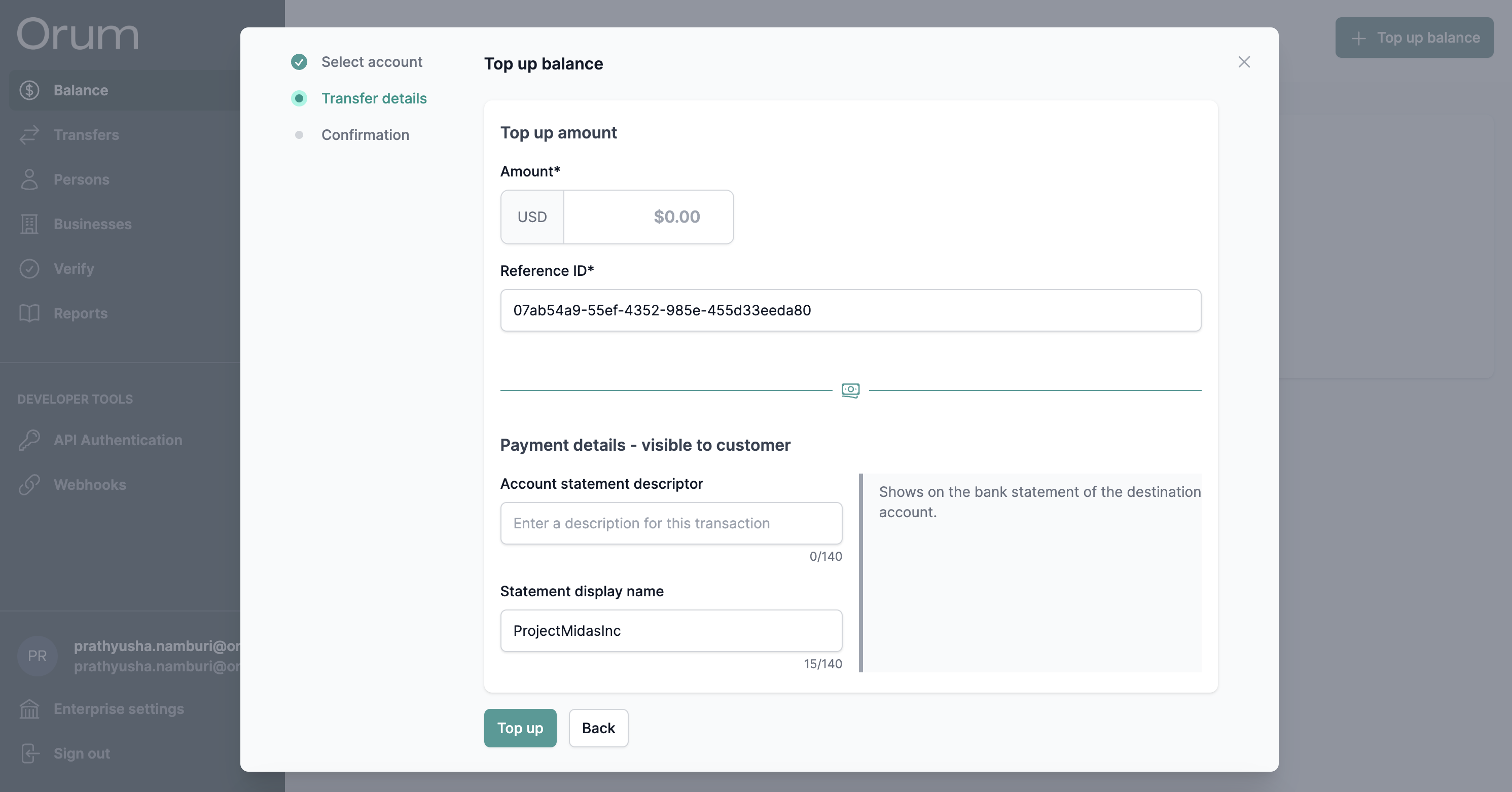
You can now top up your FBO balance directly through the portal. Simply log in to the Orum Portal and visit the "Balance" page. You should see a "Top up balance" button in the top right as below:
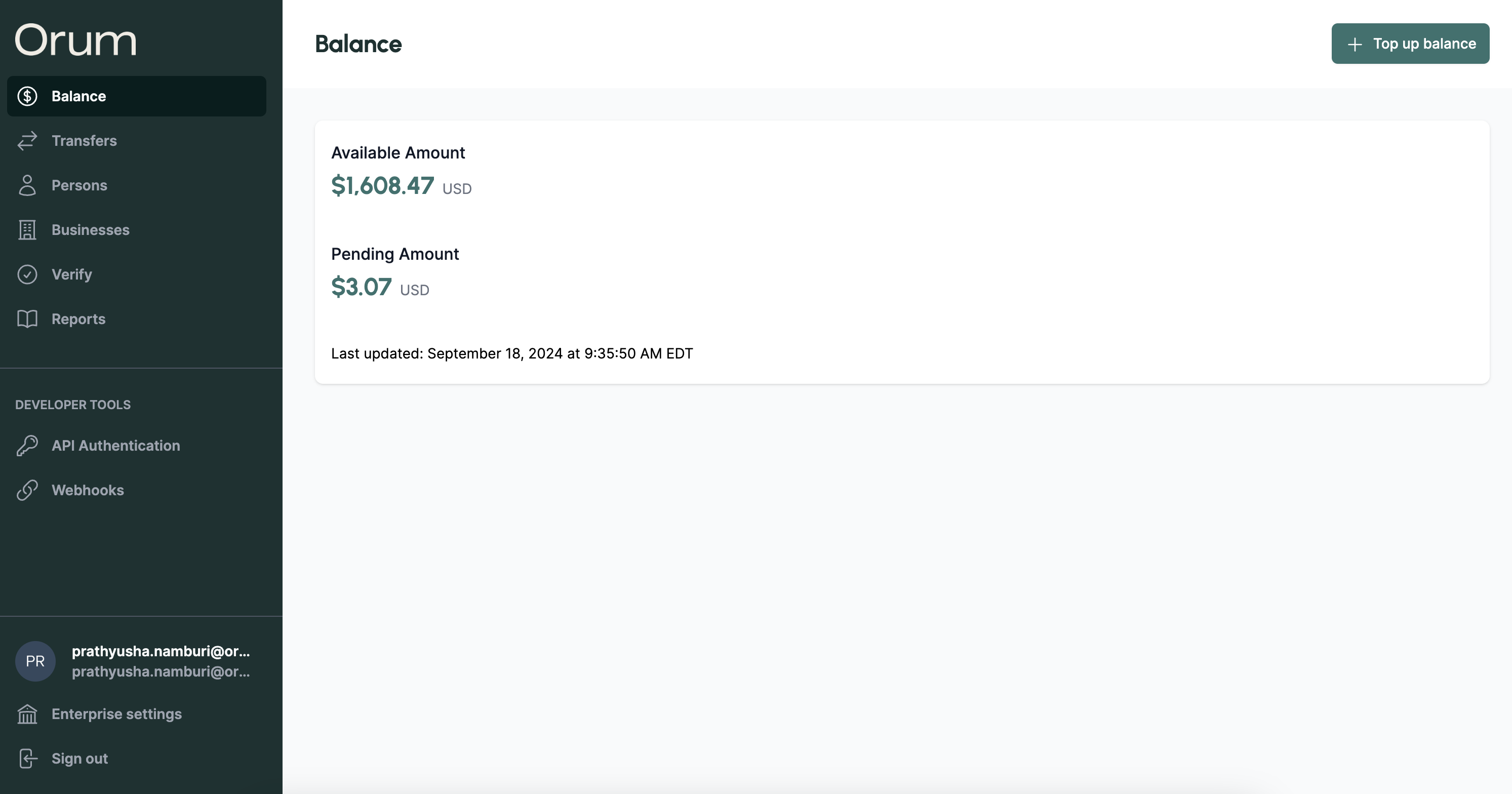 Next, click the button and select an enterprise account. If your enterprise does not have an associated enterprise account in Verified status, then you can create one directly through the modal.
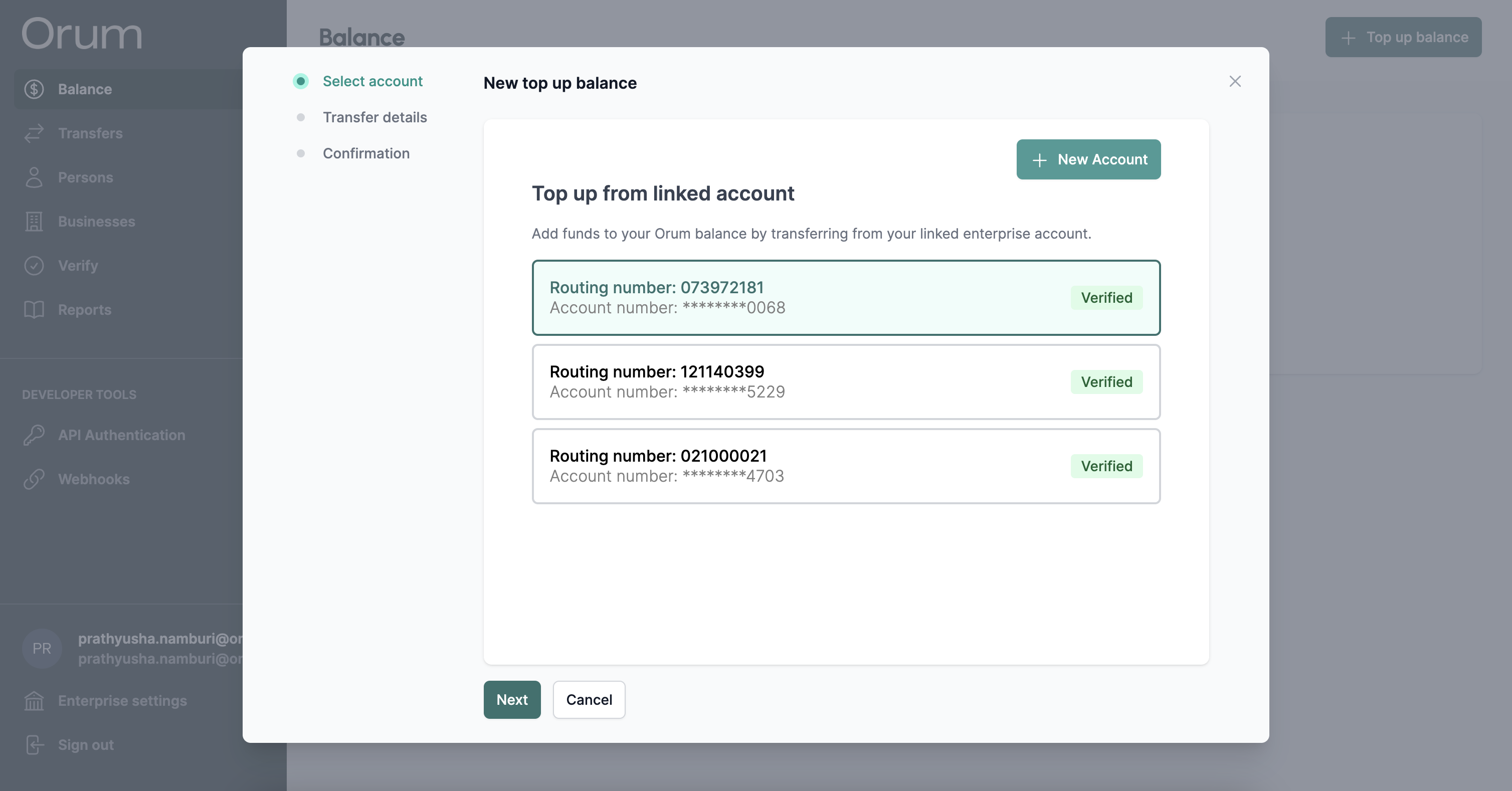 Lastly, fill out your top-up details and initiate! You will be able to track the status of the initiated transfer in the Transfers table as per usual.
 **Debits & Credits to/from a single Person or Business**
You may also initiate a debit from a single person/business, or credit a single person/business. To initiate a payment to a person/business, first visit their details page in the portal. Ex: see a Persons details page below:
**Debits & Credits to/from a single Person or Business**
You may also initiate a debit from a single person/business, or credit a single person/business. To initiate a payment to a person/business, first visit their details page in the portal. Ex: see a Persons details page below:
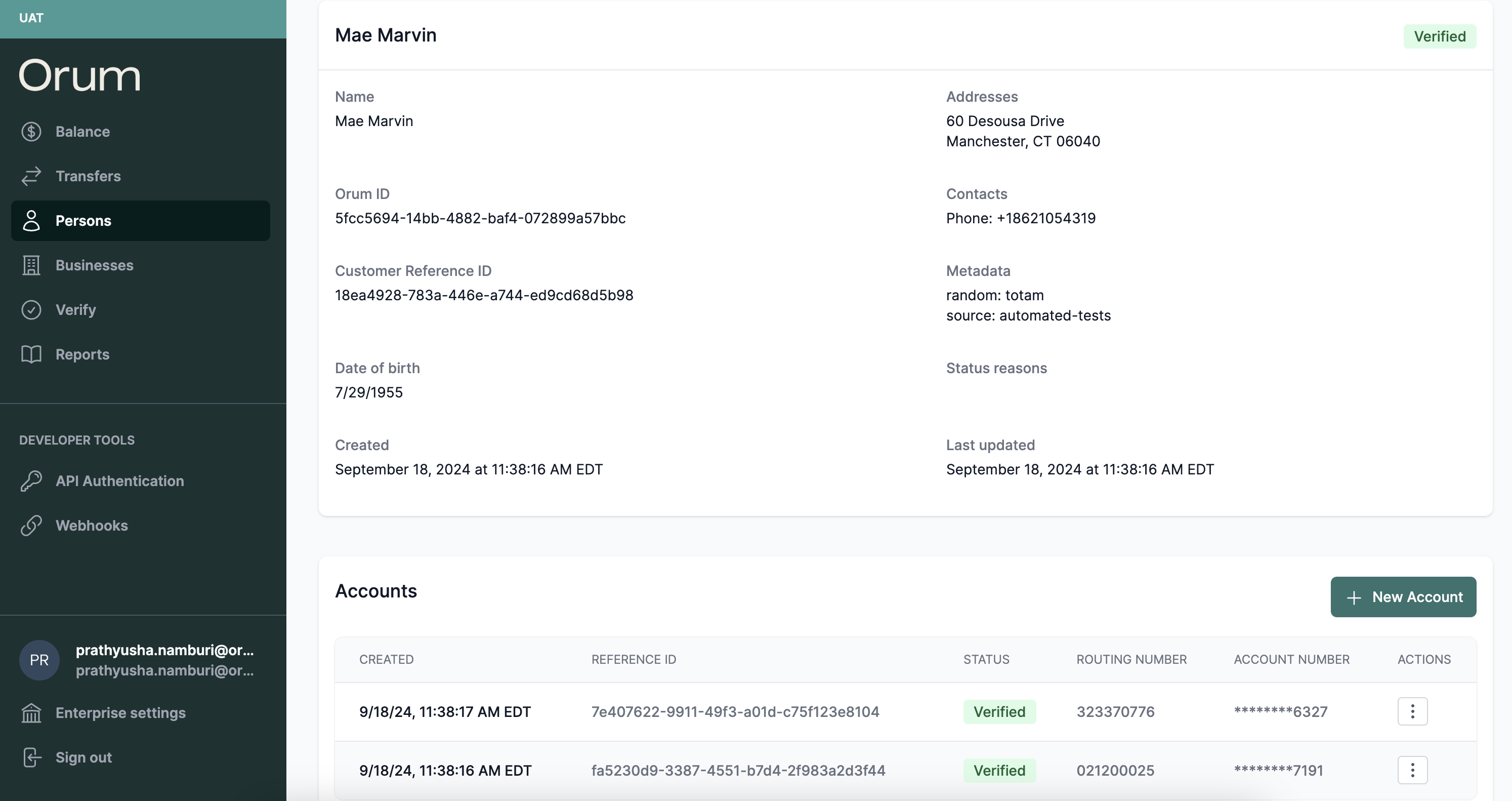 Next, locate the account to which you'd like to send/receive money from, and select the new "Transfer Money" option underneath the Actions menu of their associated accounts:
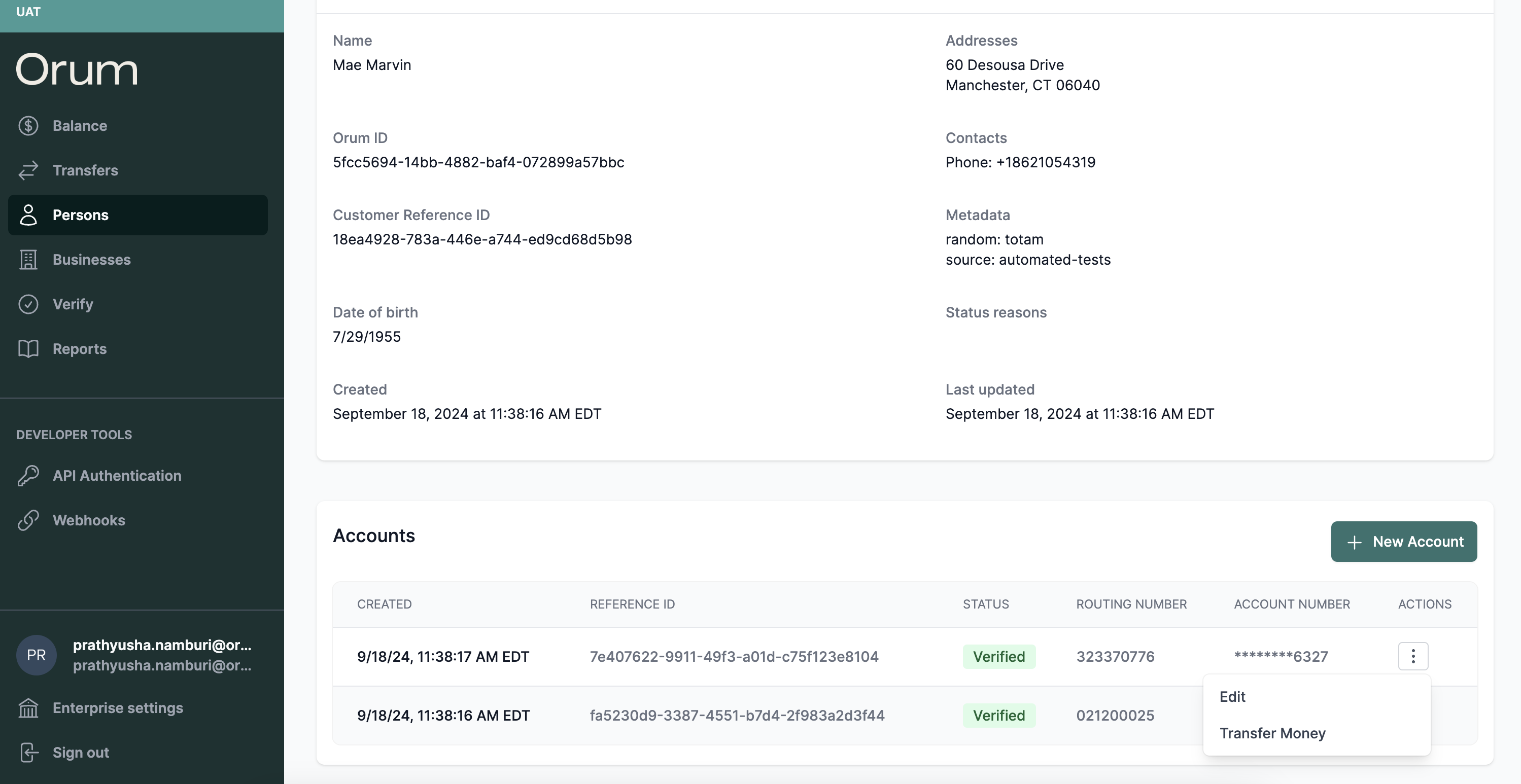 Then, fill out your transfer details and initiate! You will be able to track the status of the initiated transfer in the Transfers table as per usual.
*Note: Only users with Admin or Payment Initiator roles will be able to view and use the payment initiation feature.*
Please reach out to Orum Support with any questions or feedback. We're super excited to get this in your hands!
## New Authentication Flow
We've made two major updates to our authentication flow:
1. **Removal of API Keys:** From now onwards, you will no longer need to manage two sets of API Keys & API Credentials to authenticate to our APIs. Instead, you will only need to manage a set of API Credentials. All API calls now have the field x-api-key as optional, and only API Credentials are necessary to authenticate moving forward.
2. \*\*Updated Auth Endpoint: \*\*We have released a new auth endpoint ([/oauth/token](/api-reference/auth/post-oauth-token)) that adheres to the standard OAuth2 spec. With this update, you can now use off the shelf OAuth2 clients for your integrations! Some examples below:
1. Node.js: [simple-oauth2](https://github.com/lelylan/simple-oauth2?tab=readme-ov-file#client-credentials-grant)
2. Go: [golang.org/x/oauth2](https://pkg.go.dev/golang.org/x/oauth2/clientcredentials)
3. Python: [oauthlib](https://oauthlib.readthedocs.io/en/latest/oauth2/grants/credentials.html)
4. Java: [spring-security-oauth](https://docs.spring.io/spring-security/reference/servlet/oauth2/index.html#oauth2-client-customize-existing-grant-type)
Lastly, in order to use the new endpoint, you *must* create a new set of API Credentials through the [Orum Portal](/guides/api-authentication).
All credentials created through the Orum Portal from this point forward can only be used with the new /oauth/token endpoint.
## Previous Endpoint & Credential Deprecation Plan
We will continue to support the deprecated /authenticate and /refresh endpoints along with all previously created API Credentials. However, the functionality to rotate any existing credentials will be removed from the Orum Portal. If you must rotate any existing credentials, please reach out to Orum Support.
We will urge all existing customers to migrate to the new endpoint by January 15, 2025, and will support the deprecated endpoints and credentials until then.
## New: Verify Accounts in Bulk in the Portal
Introducing a new way to access all of the benefits of our Verify product without having to write a line of code!
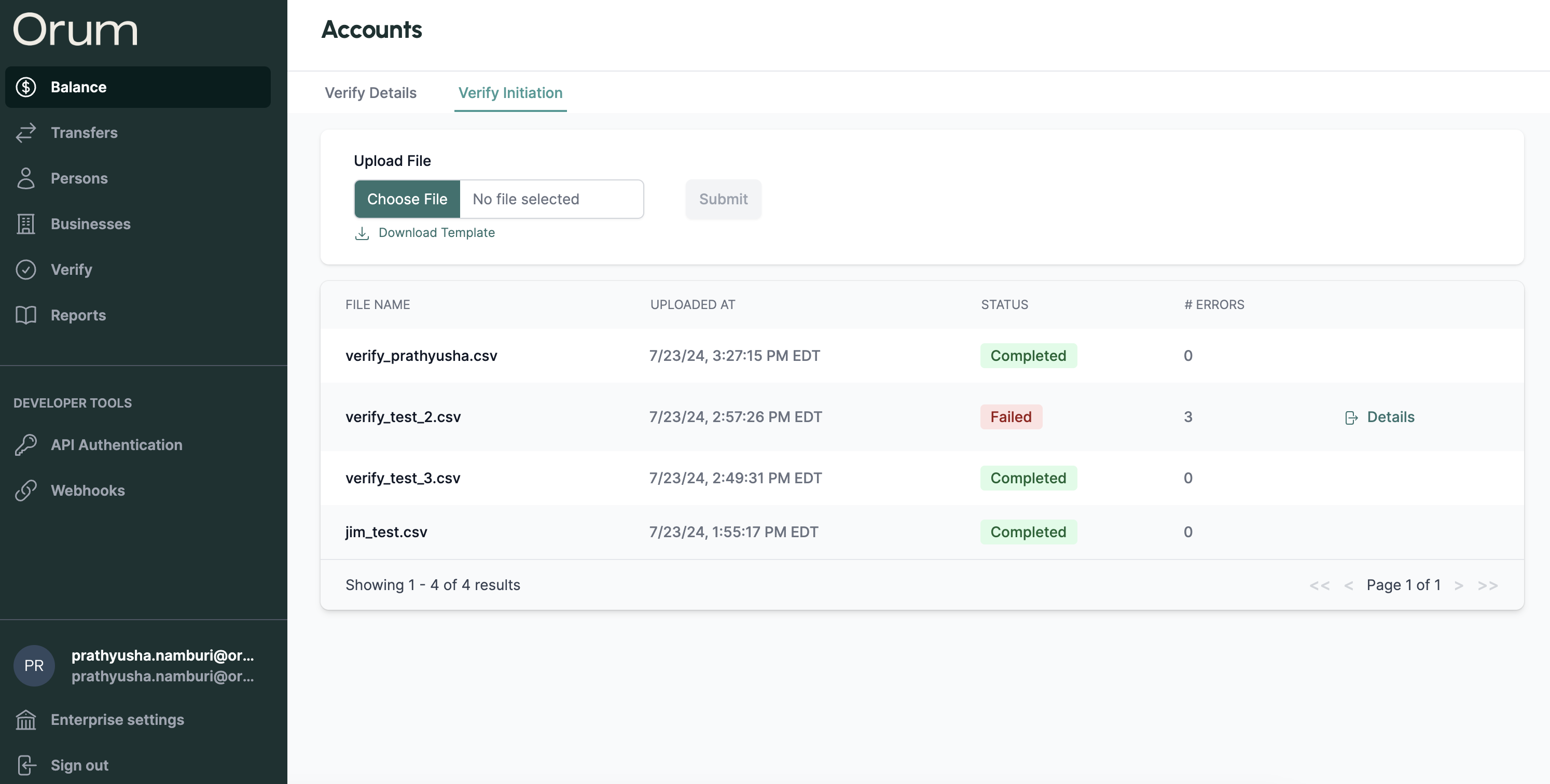
Users can now verify accounts in bulk by simply uploading a CSV containing all account details and instantly access verification results.
This new feature is available in the Verify tab in the portal under the new "Verify Initiations" tab - as seen below!
Then, fill out your transfer details and initiate! You will be able to track the status of the initiated transfer in the Transfers table as per usual.
*Note: Only users with Admin or Payment Initiator roles will be able to view and use the payment initiation feature.*
Please reach out to Orum Support with any questions or feedback. We're super excited to get this in your hands!
## New Authentication Flow
We've made two major updates to our authentication flow:
1. **Removal of API Keys:** From now onwards, you will no longer need to manage two sets of API Keys & API Credentials to authenticate to our APIs. Instead, you will only need to manage a set of API Credentials. All API calls now have the field x-api-key as optional, and only API Credentials are necessary to authenticate moving forward.
2. \*\*Updated Auth Endpoint: \*\*We have released a new auth endpoint ([/oauth/token](/api-reference/auth/post-oauth-token)) that adheres to the standard OAuth2 spec. With this update, you can now use off the shelf OAuth2 clients for your integrations! Some examples below:
1. Node.js: [simple-oauth2](https://github.com/lelylan/simple-oauth2?tab=readme-ov-file#client-credentials-grant)
2. Go: [golang.org/x/oauth2](https://pkg.go.dev/golang.org/x/oauth2/clientcredentials)
3. Python: [oauthlib](https://oauthlib.readthedocs.io/en/latest/oauth2/grants/credentials.html)
4. Java: [spring-security-oauth](https://docs.spring.io/spring-security/reference/servlet/oauth2/index.html#oauth2-client-customize-existing-grant-type)
Lastly, in order to use the new endpoint, you *must* create a new set of API Credentials through the [Orum Portal](/guides/api-authentication).
All credentials created through the Orum Portal from this point forward can only be used with the new /oauth/token endpoint.
## Previous Endpoint & Credential Deprecation Plan
We will continue to support the deprecated /authenticate and /refresh endpoints along with all previously created API Credentials. However, the functionality to rotate any existing credentials will be removed from the Orum Portal. If you must rotate any existing credentials, please reach out to Orum Support.
We will urge all existing customers to migrate to the new endpoint by January 15, 2025, and will support the deprecated endpoints and credentials until then.
## New: Verify Accounts in Bulk in the Portal
Introducing a new way to access all of the benefits of our Verify product without having to write a line of code!
Users can now verify accounts in bulk by simply uploading a CSV containing all account details and instantly access verification results.
This new feature is available in the Verify tab in the portal under the new "Verify Initiations" tab - as seen below!
 ## Add Persons, Businesses, and Accounts Directly in the Portal!
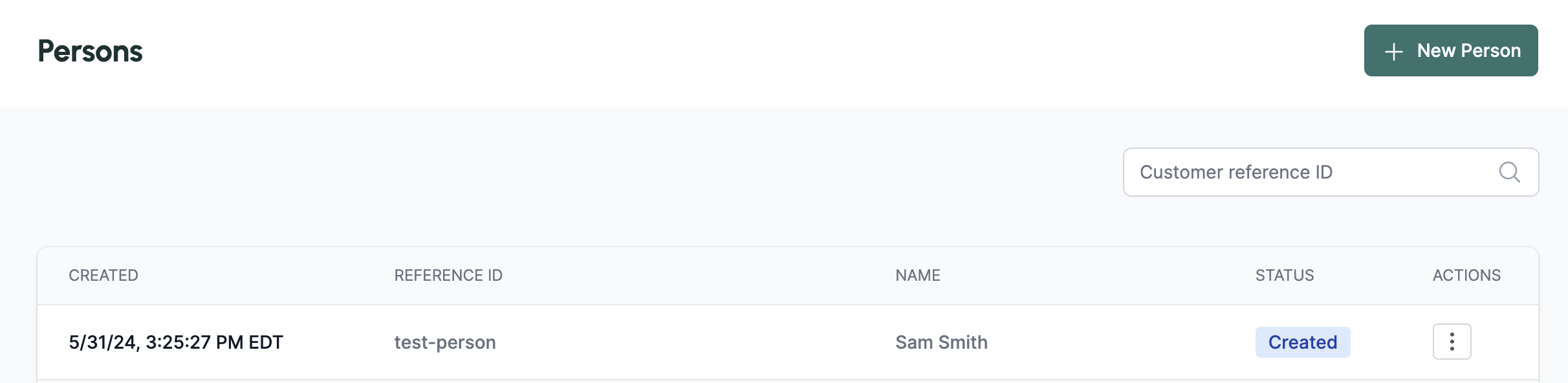
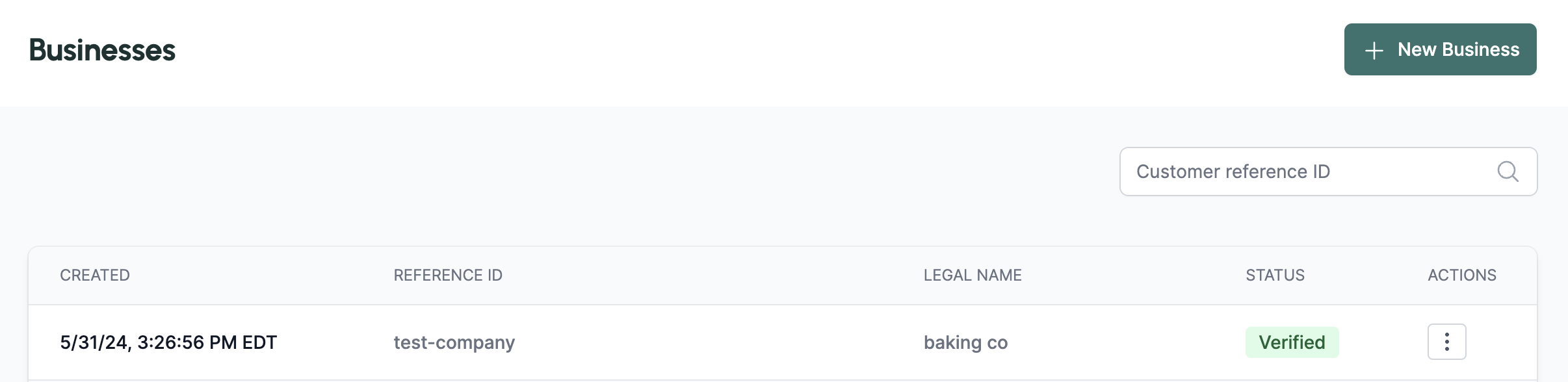
Now, you can add a Person, Business, or Account directly through the Orum Portal!
To add Persons & Businesses, please navigate to the "Persons" or "Businesses" page in the Orum portal and select the "+ New Person" or "+ New Business" button in the top right corner.
## Add Persons, Businesses, and Accounts Directly in the Portal!
Now, you can add a Person, Business, or Account directly through the Orum Portal!
To add Persons & Businesses, please navigate to the "Persons" or "Businesses" page in the Orum portal and select the "+ New Person" or "+ New Business" button in the top right corner.
 To add Accounts, please select a Person or Business from the table, and scroll down to select "+ New Account" to create an account that is associate to that Person or Business.
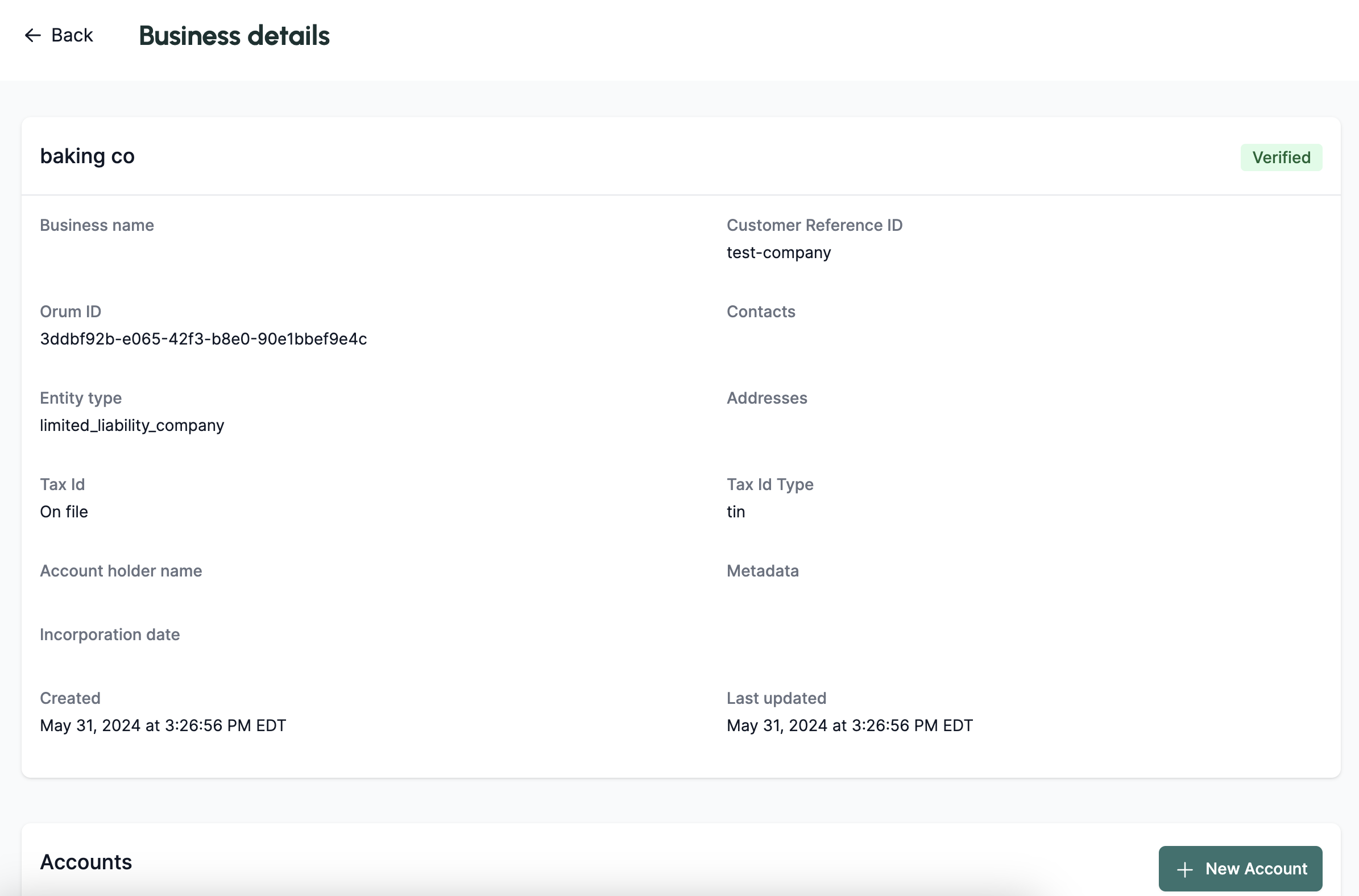 Only portal users with the *Admin* or *Payment Initiator* roles will be able to access this feature.
## Introducing Debit Block Detection
Orum customers will now be able to determine if an account is debitable, and if not - if it is due to a debit block. Orum's debit block detection enables customers to determine whether or not a debit block has been placed on an account. The goal of this functionality is to inform you when there is an account that cannot be debited, so that you can inform your end users that an action is required in order to make the account debitable.
## Transfer Groups Now Available
Transfer Groups are now available! We have recently added [Transfer Group APIs](/api-reference/deliver/transfer-groups/post-transfer-group) to allow for grouping together any set of transfers that may be associated with the same flow.
To create a transfer group, you must specify the ultimate source or destination of the group. Once specified, a group will be created, and you can attach the generated unique ID when creating all applicable transfers moving forward. Please see the updated [Transfers](/api-reference/deliver/transfers/post-transfer#body-transfer-group-id) request body.
Additionally, you may also search for all transfers associated with a transfer group by specifying the unique ID as a query parameter in the [Get Transfer API](/api-reference/deliver/transfers/get-transfers#parameter-transfer-group-id).
Only portal users with the *Admin* or *Payment Initiator* roles will be able to access this feature.
## Introducing Debit Block Detection
Orum customers will now be able to determine if an account is debitable, and if not - if it is due to a debit block. Orum's debit block detection enables customers to determine whether or not a debit block has been placed on an account. The goal of this functionality is to inform you when there is an account that cannot be debited, so that you can inform your end users that an action is required in order to make the account debitable.
## Transfer Groups Now Available
Transfer Groups are now available! We have recently added [Transfer Group APIs](/api-reference/deliver/transfer-groups/post-transfer-group) to allow for grouping together any set of transfers that may be associated with the same flow.
To create a transfer group, you must specify the ultimate source or destination of the group. Once specified, a group will be created, and you can attach the generated unique ID when creating all applicable transfers moving forward. Please see the updated [Transfers](/api-reference/deliver/transfers/post-transfer#body-transfer-group-id) request body.
Additionally, you may also search for all transfers associated with a transfer group by specifying the unique ID as a query parameter in the [Get Transfer API](/api-reference/deliver/transfers/get-transfers#parameter-transfer-group-id).